Introduction
Access to information, public services, and employment opportunities increasingly depends on online systems. When individuals lack basic digital capabilities, the consequences extend far beyond technical inconvenience—they face reduced career options, isolated social networks, and restricted access to essential public utilities. Digital literacy programs provide the fundamental knowledge, tools, and ongoing support necessary to convert basic connectivity into meaningful economic and civic participation.Building effective skill-building initiatives requires moving past simple device distribution. Sustainable progress relies on comprehensive instruction that combines foundational hardware navigation with critical evaluation, cybersecurity awareness, and practical online application. Communities thrive when members possess both the physical access to technical infrastructure and the personal confidence to utilize those tools safely.
Main Article
What Are Digital Literacy Programs?
Digital Literacy Programs are structured educational initiatives designed to teach individuals how to use technology effectively, safely, and responsibly. Rather than focusing solely on specialized technical skills like advanced software development, these programs address core competencies required for everyday life in a connected world.
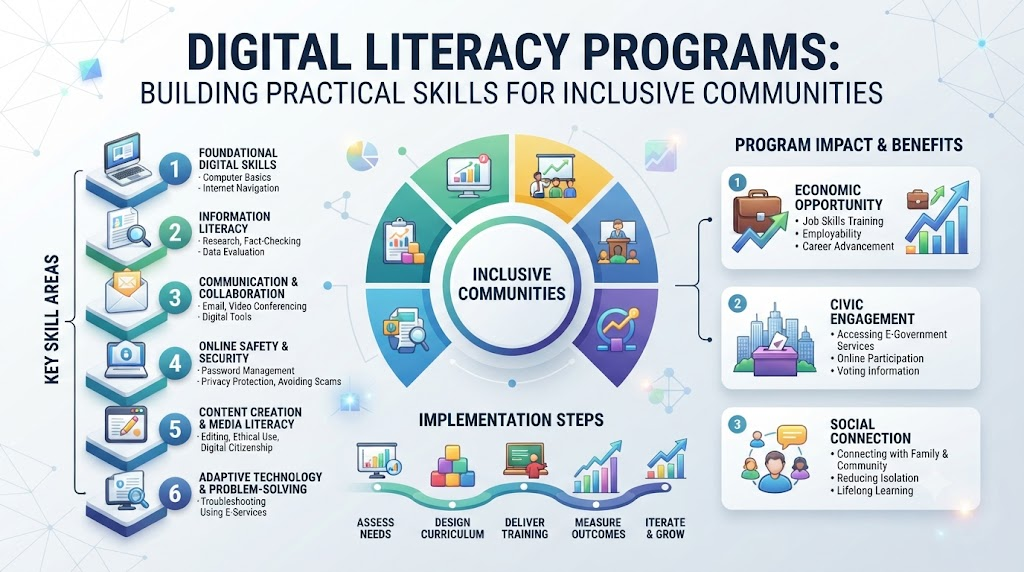
A comprehensive curriculum usually encompasses several core learning pillars:
- Foundational Hardware and Software Skills: Navigating operating systems, managing files, using input devices, and accessing local applications.
- Internet Navigation and Research: Operating web browsers, using search engines effectively, evaluating online sources for credibility, and distinguishing reliable information from misinformation.
- Online Communication and Collaboration: Managing email accounts, utilizing messaging platforms, and operating video conferencing tools safely.
- Cybersecurity and Digital Safety: Creating strong passwords, recognizing phishing attempts, understanding online privacy settings, and avoiding digital fraud.
- Practical Digital Life Skills: Utilizing online banking, applying for employment through career portals, scheduling healthcare appointments, and navigating government service platforms.
Why Digital Literacy Matters for Social Progress
Digital capability is no longer an optional skill set; it is a core requirement for full participation in modern society. When community members are excluded from digital platforms, local economies experience lower workforce participation rates, educational gaps widen, and civic engagement declines.
+-----------------------------------------------------------------------+
|                       DIGITAL LITERACY IMPACT                         |
+-----------------------------------------------------------------------+
|                                                                       |
|  +-----------------------+                 +-----------------------+  |
|  |   Workforce Readiness |                 |   Educational Equity  |  |
|  |  • Resume building    |                 |  • Homework access    |  |
|  |  • Remote work tech   |                 |  • Research skills    |  |
|  |  • Skill upskilling   |                 |  • Online learning    |  |
|  +-----------+-----------+                 +-----------+-----------+  |
|              |                                         |              |
|              +-------------------+---------------------+              |
|                                  |                                    |
|                                  v                                    |
|                     +-------------------------+                       |
|                     | Sustainable Community   |                       |
|                     | Economic Growth &       |                       |
|                     | Inclusive Civic Life    |                       |
|                     +-------------------------+                       |
|                                  ^                                    |
|              +-------------------+---------------------+              |
|              |                                         |              |
|  +-----------+-----------+                 +-----------+-----------+  |
|  |   Essential Services  |                 |    Safe Digital Life  |  |
|  |  • Telehealth access  |                 |  • Privacy protection |  |
|  |  • Online banking     |                 |  • Fraud prevention   |  |
|  |  • Public benefits    |                 |  • Safe browsing      |  |
|  +-----------------------+                 +-----------------------+  |
|                                                                       |
+-----------------------------------------------------------------------+
When individuals master basic digital tools, community outcomes improve across multiple areas:
- Workforce Participation: Modern job searches, applications, and onboarding processes occur almost exclusively online. Basic digital competence enables job seekers to create professional resumes, find opportunities, and communicate with employers.
- Educational Access: Students require internet and device skills to complete assignments, research topics, and access supplementary learning materials. Parents need similar skills to monitor academic progress and coordinate with schools.
- Financial Inclusion: Online banking and mobile financial platforms allow individuals in underserved regions to manage assets, pay bills securely, and avoid predatory financial practices.
- Access to Public Services: Social safety nets, healthcare scheduling, tax filing, and municipal forms rely increasingly on digital portals. Literacy programs ensure citizens retain access to necessary benefits.
Key Barriers to Digital Inclusion
Designing effective programs requires understanding the specific obstacles facing marginalized groups. Digital exclusion rarely stems from a single factor; it is usually caused by an overlap of systemic challenges.
1. Physical and Financial Infrastructure Gaps
High-speed broadband internet remains unavailable or prohibitively expensive in many rural and low-income urban areas. Furthermore, the cost of personal computers, laptops, and tablets presents a financial barrier for families with limited resources.
2. The Digital Confidence Gap
Individuals who grew up without exposure to computers often experience anxiety regarding technology. Fear of making mistakes, compromising personal security, or damaging hardware can deter adult learners from attempting to use digital tools.
3. Language and Accessibility Barriers
Much of the instructional material and software software interfaces available online are designed for fluent English speakers with standard sight, hearing, and motor capabilities. Non-native speakers and individuals with physical disabilities frequently find standard digital interfaces difficult to navigate without specialized accommodation.
Core Elements of Effective Digital Literacy Programs
To deliver lasting results, educational initiatives must go beyond basic lectures. Successful strategies rely on learner-centric, highly adaptable methods tailored to the specific needs of participants.
Cohort-Based and Peer Mentoring Models
Adult learners retain practical knowledge better when instruction occurs in supportive, small-group environments. Pairing learners with technical volunteers or local mentors builds a comfortable space where students feel safe asking questions without fear of judgment.
Contextualized, Goal-Oriented Learning
Abstract technical lessons often fail to keep participants engaged. Effective programs structure lessons around immediate, practical tasks—such as sending an email to a family member, searching for local public transportation routes, or booking a medical consultation online.
Flexible Curriculum Delivery
Participants often balance work, caregiving responsibilities, and financial pressures. Offering flexible scheduling—including evening sessions, weekend workshops, and low-bandwidth self-paced materials—ensures higher completion and retention rates.
Addressing Safety, Privacy, and Online Ethics
As access expands, so does exposure to digital security threats. A responsible education program must integrate digital safety into every step of its curriculum, rather than presenting it as an isolated advanced topic.
Instructors should teach students how to identify suspicious communications, protect sensitive personal data, and evaluate information sources critically. Understanding how personal data is collected and processed builds informed users who can navigate the digital ecosystem with confidence.
The Role of Technology Nonprofits and Partnerships
No single organization can bridge the digital divide alone. Cross-sector collaboration between grassroots nonprofits, corporate entities, and educational institutions creates a reliable pipeline of resources, expertise, and infrastructure.
- Nonprofit Organizations: Organizations like the Cotocus Foundation help coordinate community-focused education, research accessible training models, and connect local learners with practical technology tools.
- Corporate Partners: Businesses provide financial support, donate refurbished hardware, and encourage employees to volunteer as technical mentors.
- Educational Institutions: Schools and libraries serve as physical learning hubs, offering public internet access, computer labs, and quiet study spaces.
Comparison Table: Program Models for Digital Literacy
| Program Model | Primary Target Audience | Core Strengths | Key Implementation Challenges | Ideal Resource Requirements |
| Community Workshop Series | Seniors, job seekers, local residents | Low friction, highly social, immediate community feedback | Variable attendance, wide range of initial skill levels | Community center space, donated laptops, volunteer instructors |
| Integrated Academic Modules | K–12 students, youth innovators | Standardized curriculum, long-term impact tracking | Rigid administrative guidelines, limited classroom time | School computer labs, trained teaching staff, curated software |
| Workforce Upskilling Clinics | Unemployed or underemployed adults | Clear career focus, high learner motivation, measurable economic outcomes | Requires regular updates to match industry standards | Industry-aligned software, dedicated technical mentors, job placement networks |
| Mobile Tech Labs | Rural communities, isolated populations | Overcomes geographical barriers, directly brings hardware to users | High maintenance costs, vehicle logistics, unpredictable weather | Custom mobile unit, wireless internet hotspots, portable devices |
Practical Tips / Key Takeaways
- Start with Direct Community Input: Survey local residents before designing curricula to identify their actual needs, priorities, and daily technical barriers.
- Prioritize Security First: Teach basic privacy concepts, password management, and scam awareness alongside initial keyboard and mouse skills.
- Emphasize Hardware Sustainability: Establish reliable repair and maintenance plans for all donated or public devices to keep equipment working over time.
- Recruit Local Mentors: Train volunteers from the target community to lower cultural barriers and foster long-term trust.
- Measure Practical Outcomes: Track success through practical milestones—such as submitting job applications or accessing healthcare portals—rather than relying solely on course attendance.
10 FAQs
1. What is the main goal of a digital literacy program?
The main goal is to equip individuals with the foundational technical skills, critical thinking capabilities, and online safety awareness needed to use digital tools confidently in daily life, education, and employment.
2. How do basic computer classes differ from digital literacy programs?
Basic computer classes often focus strictly on technical mechanics, such as typing or operating specific software. Digital literacy programs take a broader approach, teaching users how to evaluate online information critically, protect their personal data, and apply technical tools to real-world tasks.
3. Why is online safety such an important part of digital literacy?
New Internet users are often targeted by online scams, phishing schemes, and identity theft. Teaching digital safety ensures learners can protect their personal identity, financial information, and devices while using online services.
4. How can non-technical volunteers support digital literacy initiatives?
Non-technical volunteers can help organize workshops, assist learners with basic practice tasks, coordinate schedules, provide translation support, or offer encouragement to students building digital confidence.
5. What devices are best suited for teaching digital literacy?
A balanced program introduces both mobile devices (smartphones or tablets) and full-desktop or laptop computers. Mobile devices cover daily personal communication, while laptops are essential for tasks like writing resumes, completing coursework, and managing workplace projects.
6. How do digital literacy programs support rural communities?
Rural programs often utilize mobile technology labs, community center hubs, and offline-capable instructional materials to deliver training in areas with limited broadband access or sparse public facilities.
7. What role do corporate partnerships play in digital literacy programs?
Corporate partners support initiatives by funding hardware procurement, donating surplus equipment, supporting curriculum design, and encouraging employees to volunteer as technical mentors.
8. How can instructors teach learners with varying skill levels in one room?
Instructors can use self-paced practical modules, group students into small learning cohorts based on confidence, and assign peer mentors to provide tailored, one-on-one support where needed.
9. What metrics best measure the impact of a digital literacy initiative?
Key metrics include training completion rates, demonstrated skill growth through practical exercises, self-reported changes in user confidence, and long-term outcomes like job placements or usage of public digital services.
10. How do digital literacy programs adapt to evolving technologies like AI?
Modern programs gradually integrate foundational concepts of emerging technologies—such as recognizing automated content, using search assistants, and understanding basic data privacy—ensuring curricula remain practical and up-to-date.
Conclusion
Bridging the digital divide requires a ongoing commitment to community education, accessible infrastructure, and inclusive program design. Expanding internet access is only the first step; individuals must also gain the practical skills and confidence needed to navigate the digital landscape safely and effectively.By prioritizing real-world applications, strong community partnerships, and accessible learning environments, organizations can help unlock new educational, professional, and civic opportunities for underserved populations. Through collaborative efforts led by nonprofits like the Cotocus Foundation, communities can continue building a inclusive digital ecosystem where technology serves as a tool for shared growth.